Sportzfy TV APK Download

Sportzfy TV Logo

Name

Sportzfy TV

Version

v11.5

Requirements

Android 7+

Size

15.90 MB

Developer

Sportzfy

Latest Update

December 2025

Category

Sports

Have you ever tried to find an application that allows you to watch live matches of cricket like ICC World Cup, T20 International, ODI International, PSL, Big Bash, T20 Blast, BPL or wondering whether to watch live matches of other sports like badminton, football, hockey, soccer on your mobile device for free without subscribing to any of the premium subscriptions, boffering and in HD Quality?

Well, Sportzfy TV APK is an Android application, providing the opportunity to watch all of your favourite content for free! Click the “Sportzfy TV Download” button above to get Sportzfy TV APK latest version. Additionally, If interested in knowing about what Sportzfy TV App is, its features, categories, pros & cons, procedure of downloading and installing Sportzfy TV APK and much more, read this article in full.

Sportzfy TV APK banner

What is Sportzfy TV App

Sportzfy TV App allows sports enthusiasts to watch live sports streams directly on their Mobile Phone without need to pay for anything because it’s totally free and provides users with an easy to use Interface (UI) through which everyone can easily navigate and find the content they want. Sportzfy TV is supported by Android and currently unavailable for IOS. PC and MAC users can also enjoy it by installing an Android Emulator through which they can use Android Apps on their Windows or macOS.

Screenshots

What’s New in Sportzfy TV v11.5

  • Watch favorite sports matches in a resizable, moveable floating window while performing other tasks on your mobile phone using new Picture-in-Picture (PiP) Mode.
  • Now, get alerts before your favorite cricket, football, tennis or other match go live with the all new “Live Match Reminder Notifications” feature.
  • New streaming servers introduced for better speed, quality and stability, allowing you to enjoy High Quality Sports experience without buffering and interruptions anytime, anywhere.
  • Inbuilt Video Player enhanced for improvement of streams loading time and to provide a smooth viewing experience.
  • Optimized for other devices such as Android TV.

Play Protect Issue – fixed

While installing an older version, you may see a warning “Blocked by Play Protect” because of non-compliance with their policies. If you’ve temporarily disabled Play Protect, simply enable it because the latest version is now complying with their policies. Enabling Play Protect in your device will reduce the risk of installing harmful apps in your device.

Key features of Sportzfy TV App

Sportzfy TV App Features banner

High Definition Quality

One of the amazing features is High Quality (HD) Streaming, allowing people to watch their favourite sports with 1080p Resolution that increases entertainment to a significant extent. Also, Sportzfy TV App automatically adjusts the quality of the streaming according to your connected network or the Wifi to reduce buffering.

Simple Interface

If we talk about the UI, the developer of Sportzfy TV App has kept the user interface in mind to provide users with a simple interface, allowing sports fans to navigate within the app without any complications. Because of its simple interface, you are about a few clicks away whether you want to watch live streaming and highlights or simply want to see the live scores.  

Range of Sports Channels

A wide range of sports channels are available that allows you to enjoy sports of every kind in different languages, making it accessible for a global audience. Whether you’re a Cricket, football or soccer enthusiast, you can enjoy your favourite game with multiple channels.

Direct access to Cricket Channels

Cricket fans can directly access a wide range of channels through which you can enjoy cricket matches. This means that whether you want to enjoy different leagues or International tournaments, it ensures you are fully covered. By having direct access to cricket channels, it saves time of cricket fans ensuring they don’t miss any action.

Live Score Updates

As we all know sometimes we don’t have time to watch live sports streams due to travelling, being busy at work or something else. Another feature that provides sports enthusiasts with live scores updates without need to stay connected with the game. Once you turn on notification, it will provide you with the live score updates which is incredibly simple and convenient.

Advanced Notifications

Advanced Notification feature allows people to receive alerts for the upcoming matches. If you enable this feature, it will send notifications about the upcoming match, incredibly helpful for those who are so passionate about watching cricket and football live matches without missing any of the action.

No Delay

Currently its size is 15.90 MB means it takes too low storage space of your device, making it super lite. Sportzfy TV App provides a seamless experience to its users by providing them with the live content with zero delays. Watching sports without any delays not only enhances enjoyment but also creates an uninterrupted experience that feels truly amazing.

Languages Support

Sportzfy TV App provides users with many languages to switch according to their choice. It can be frustrating when someone wants to enjoy their favourite live streams but the language is hard to understand, enhancing the overall user-experience for the users around the world.

No Login / Signup

One of the fantastic features is “No Need to Login”, saving the time of the sports enthusiasts by providing them with the sports content without needing login or registration. This is super convenient because sports fans who just wanna watch live matches or highlights can do so quickly.

No Subscription/Membership

You can watch all of your favourite games completely free of cost as there is No Subscription/Membership, providing ability to the sports enthusiasts to access the content they are passionate about without subscribing to any of the plans within the app. You’ve unlimited access to the live sports streams which enhances overall enjoyment.

Live Sports Streaming

Sports enthusiasts can get a comprehensive viewing experience of live sports streaming with a wide variety of events, tournaments, competitions from across the globe of games with minimal buffering and in HD Quality, providing convenience to the sports fans because they can enjoy live matches of the games they love from the comfort of their home.

Multiple Servers

Sportzfy provides you with access to multiple servers that ensure uninterrupted sports viewing experience. You can switch between multiple servers options that appear above the live stream, If one of the servers shows error or does not work correctly.

Search Option

Now, you’ll see a new feature in the Sportzfy known as “Search” that will help you browse within the application. You can use this feature to browse channels and find them within seconds, avoiding waste of time in manually opening multiple sports categories. 

Inbuilt IPTV Player

There is an IPTV Player in Sportzfy that lets you add channels by entering their name and the URL. You can access IPTV Player in the Sportzfy TV App by clicking 3 lines (☰) in the upper left corner > Playlist/IPTV. 

Additional Features

Sportzfy TV App Features infographic e1731528635184

Categories of Sportzfy TV

Home/Live Events

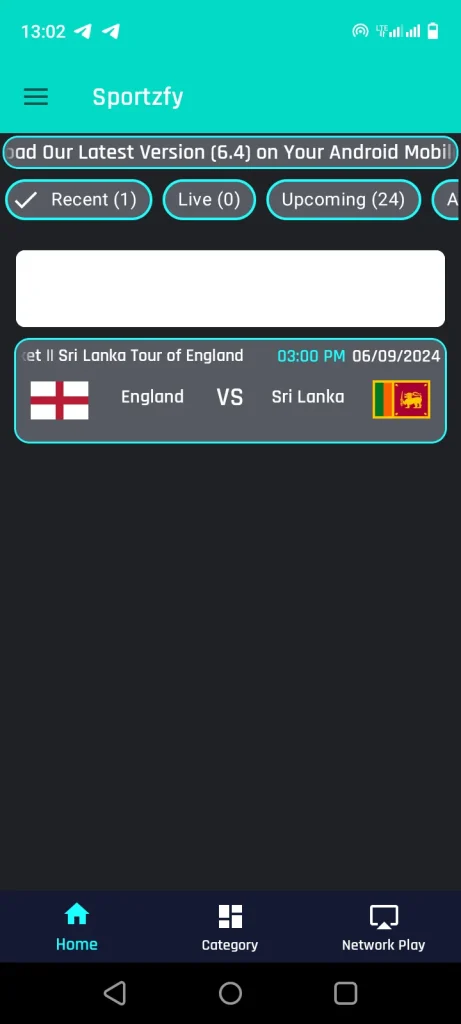
An amazing option, providing sports enthusiast with instant access to live sports events of football, volleyball, cricket or other popular sports just on their Android Device. Here sports fans can access events that have recently been played, live events, also updates about the events that are upcoming, enhancing the overall experience. 

Live Events Category Screenshot

Sports Channels

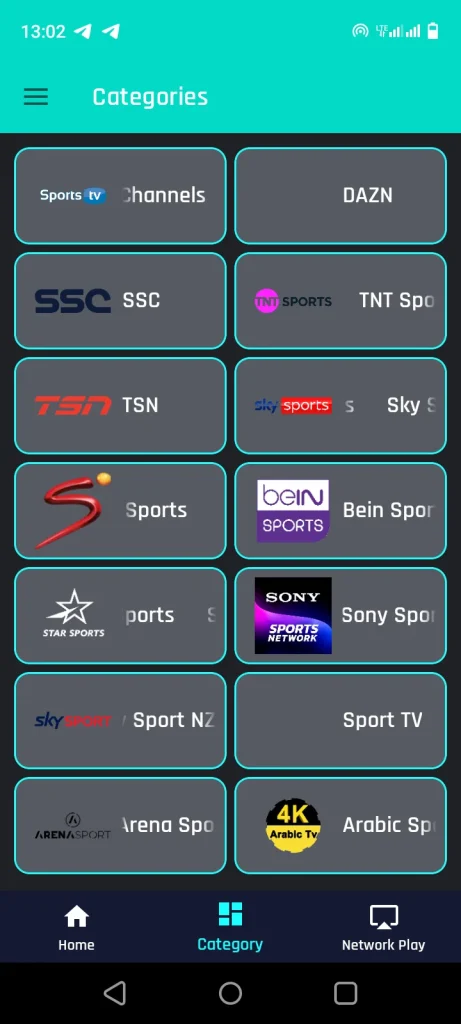
After the “Home” section, you’ll see an option known as “Category” that allows access to live sports channels. You can enjoy High-Quality (HD) live sports streams across multiple servers, making it perfect for sports enthusiasts who want to enjoy their favourite sports anytime. 

Sports Channels category Screenshot

Highlights

3nd Option in the bottom, allowing people to watch “Highlights” of the matches. Highlights option is providing users with convenience to enjoy short clips of the match that were fantastic. People who don’t want to watch the entire match or have missed it can be entertained by simply navigating to the “Highlights” section.

Highlights category Screenshot

Sportzfy TV VS Other Streaming Apps 

Side-by-Side Feature Comparison of Sportzfy TV VS Other Streaming Apps including Cricfy TV and PikaShow is given below:

Sportzfy TV VS Other Streaming Apps image
FeatureSportzfy TVCricfy TVPikaShow
High Quality (HD) StreamingYESYESYES
Multi-Language SupportNOYESYES
No Registration RequiredYESYESYES
Works Without VPNYESYESYES
User InterfaceEasy-to-UseEasy-to-UseEasy-to-Use
Match HighlightsYESNONO
App Size15.9 MB16.4 MB19.0 MB
Streaming of Live Cricket YESYESYES
Operating System (OS)AndroidAndroid Android
Content Quality ControlYESYESYES

How to Download Sportzfy TV APK on Android Device

  • Simply scroll up and click “Sportzfy App Download” button. It will move you to the download page of this website where you’ll download the Sportzfy TV APK file.
  • Click “Sportzfy APK Download” button on the downloading page of this website to initiate downloading Sportzfy TV APK on your Android Device.

How to Install Sportzfy TV on Android Device

  • Enable “Unknown Sources” for the file manager through which you’re going to install Sportzfy TV APK from your device security settings, if you’ve not already enabled it.
  • Open your device “file manager” and look for the folder where you’ve downloaded the Sportzfy TV APK file.
  • Click “Install” button to start installing the Sportzfy TV on your mobile device.
Unknown sources screenshot
screenshot 1
screenshot 3

How to Update Sportzfy TV to the latest version

Updating Sportzfy TV to the latest version is straightforward. Simply open Sportzfy TV on your Android Device, navigate to the sidebar and click the “Update App” button. This will move you to the website where you’ll download the latest version. After downloading the latest version, navigate to the file manager to locate the Sportzfy TV APK file. Follow on-screen instructions to successfully update.

How to update screenshot

Additionally, check out Sportzfy TV Old Versions, if the latest version is not working properly on your Android Device. If you face error while updating it, go to Sportzfy TV Errors and Solutions article.

Minimum and Maximum System Requirements

System RequirementsMinimumMaximum
Android VersionAndroid 5.0+ (Lollipop)Android 10.0+ or higher
Device RAM2GB RAM8GB RAM or more
Free Storage Space20MB free storage50MB+ (for smooth operation and cache)
Screen Resolution720p HD1080p Full HD or higher
ProcessorQuad-core or Octa-core (1.5 GHz)Octa-core (2.5 GHz or more)

Why Sportzfy App Is So Unique

Sportzfy App is unique, it’s designed for sport lovers who want uninterrupted and totally free access to live sports streams. It does not require login or registration – Just open the app and start streaming. It’s too light weight and provides a smooth playback even on older smart phones. Sportzfy provides a clean UI and fully focused on sports and there is no diverse content, providing a more dedicated viewing experience.

Sportzfy APK — A Game-Changer for Sports Fans

Sportzfy APK is a game changer as it connects its users with a world of live streams of various sports including cricket, football, soccer, tennis, and more directly on their mobile phone with accessibility of 24/7. You just need to open the Sportzfy APK and start watching live sports streams anytime, anywhere with fantastic UI/UX.

How to Use Sportzfy TV

There is no need to worry, if you don’t know how to use Sportzfy TV for watching live streams of your favourite sports on Sportzfy TV. Simply you’ve to visit the Guide for Sportzfy TV article for the step-by-step explanation that may help you know the procedure of using it.

Why Use Sportzfy TV

Sportzfy TV is for those who loves watching live sports streaming of various sports and want to catch live action for free. Sportzfy provides you with multiple channels that let you watch different games that can be accessed with a beautiful and clean UI. It doesn’t keep too much storage space because of its small size. You can also install it on your PC for a bigger screen and better live sports experience using Android Emulator. 

How to fix Sportzfy failed to get live Events

Check Internet Connection: A poor internet connection can cause failure in loading live events or buffering. Ensure, you’re using a stable and High Quality internet connection. Try switching between Wifi. 

App Update: Update app to the latest version and check if the issue may be resolved. 

Cache Clearing: If the app is failing in getting live events, Try clearing App Cache because it can help resolve any temporary data issues. 

Reinstall the App: Still, if the problem is not resolved, reinstall the Sportzfy TV. 

Compatibility: Make sure your Mobile Device meets the minimum System Requirements to smoothly run the app.

Sportzfy TV Alternatives

  • GHD Sports
  • Live NetTV
  • Cricfy TV
  • HD Streamz
  • PikaShow
  • Swift Streamz
  • Pluto TV
  • Yacine TV
  • ThopTV
  • Oreo TV
  • RedBox TV
  • Live Football TV
  • Hesgoal TV
  • Ostora TV

Comparison of Sportzfy TV with Alternatives

Pros and Cons

Pros

  • You can download it for free.
  • Safe and Secure.
  • Multilingual.
  • HD Graphics with Clear Sound.

Cons

  • Not available for IOS.
  • A stable Internet connection is required.
  • Third-party app.
  • Can’t download content to watch it later without the internet.

Yes, it is safe but make sure you download it from a trusted website.

Yes, you can use Sportzfy App on a Smart TV and enjoy live sports streaming on a large screen. Visit how to install Sportzfy on Android TV article, if you want to download and install it on Android/Smart TV efficiently.

Yes, you can conveniently watch sports events including cricket, football, soccer, volleyball and more.

Yes, Sportzfy App is totally free!

You can download Sportzfy TV by clicking the “Sportzfy App Download” button on this website.

If Sportzfy App is not working on your mobile device, visit Why is the Sportzfy App not working? How to fix it article for troubleshooting tips.

You can download Sportzfy TV APK by clicking the “Sportzfy App Download” button with ease. You can also know what Sportzfy is, its features, categories, pros & cons, system requirements, some most asked questions, and more. If you face issue while downloading Sportzfy TV APK, feel free to contact us.

Updated On: Monday, 1 December 2025